My Hurricane Tracker & Alerts
- 4.7
- Rating
- 500.00K
- Installs
- Free
- Price

 Analysis by App-foxy
Weather apps often try to cover everything, while My Hurricane Tracker & Alerts has a much clearer job: helping me follow hurricanes, tornadoes, cyclones, and the forecast information around them. I found that focus useful because severe weather is not the moment when I want to dig through unrelated widgets, lifestyle forecasts, or a crowded news feed. I want the map, the current path, the expected movement, and enough context to decide whether I should keep watching conditions.
Developed by JRustonApps B.V., this free weather app is aimed at anyone who wants more than a simple temperature forecast. It is available to everyone, runs on Android from version 8.0 onward, and has built a strong audience with an average rating of 4.7 from around 13 thousand ratings and more than 500 thousand installs. I see those figures as a sign that the focused approach works for many people, although popularity alone does not make it the right choice for every weather need.
How My Hurricane Tracker & Alerts feels in everyday use
I find this app easiest to approach when I treat it as a focused tracker, not a replacement for my everyday forecast. This section looks at how that distinction shapes a first visit and why a clear purpose helps me get useful context without feeling I need to monitor every screen constantly.
You May Also Like

 Blood Strike: 2.5 Anniversary
Blood Strike’s Loadouts Turn Every Drop Into a Tactical Gamble
A close look at Blood Strike’s custom loadouts: how fast access to signature weapons reshapes its battle royale rhythm, rewards preparation, and narrows the gap between fights.

 Pandora - Music & Podcasts
Pandora’s Music Is Easy to Start, but Harder to Recover
Pandora’s strength is its low-effort path from a seed to a station. Its weak spot is how much confidence it asks you to place in connection, setup, and quiet recovery.

 8 Ball Pool
 Is Built on Rivalries, Rematches, and Routine
A close look at the rivalries, rematches, shared routines, and unanswered safety questions that turn a quick pool match into a persistent mobile community.

 Samsung Music
’s Quiet Strength Is Playing What You Already Own
Its reach comes less from spectacle than from dependable access to a personal library. That simplicity is both the app’s strongest retention engine and its ceiling.

 AccuWeather: Weather Radar
AccuWeather Review: A Quick, Clear Forecast for Everyday Decisions
For everyday plans, the best forecast is the one you can understand quickly. AccuWeather makes rain timing, radar, and local conditions easy to act on, with a few trade-offs.

 Hill Climb Racing
Why Hill Climb Racing Still Turns Crashes Into One More Run
A tiny car, a bumpy hill and one more upgrade: Hill Climb Racing keeps resurfacing because its simple chaos makes every near-miss feel personal.
More From Our News Desk



A focused start is helpful when time matters
My first impression is that the app makes more sense when I open it with a specific concern. If there is a tropical system developing, a tornado threat in the wider area, or a cyclone affecting a planned trip, the dedicated subject immediately feels more appropriate than a general forecast app. Instead of treating extreme weather as one small card among many, it puts the event itself at the center of the experience.
That focus also affects perceived speed. An app that is designed around a narrower set of weather information can feel quicker to understand, even when the underlying data still needs time to load. I do not have to mentally filter out pollen counts, hourly commute suggestions, or unrelated news before finding the information I opened the app to see. The useful kind of speed here is not only how fast a screen appears; it is how quickly I can make sense of it.
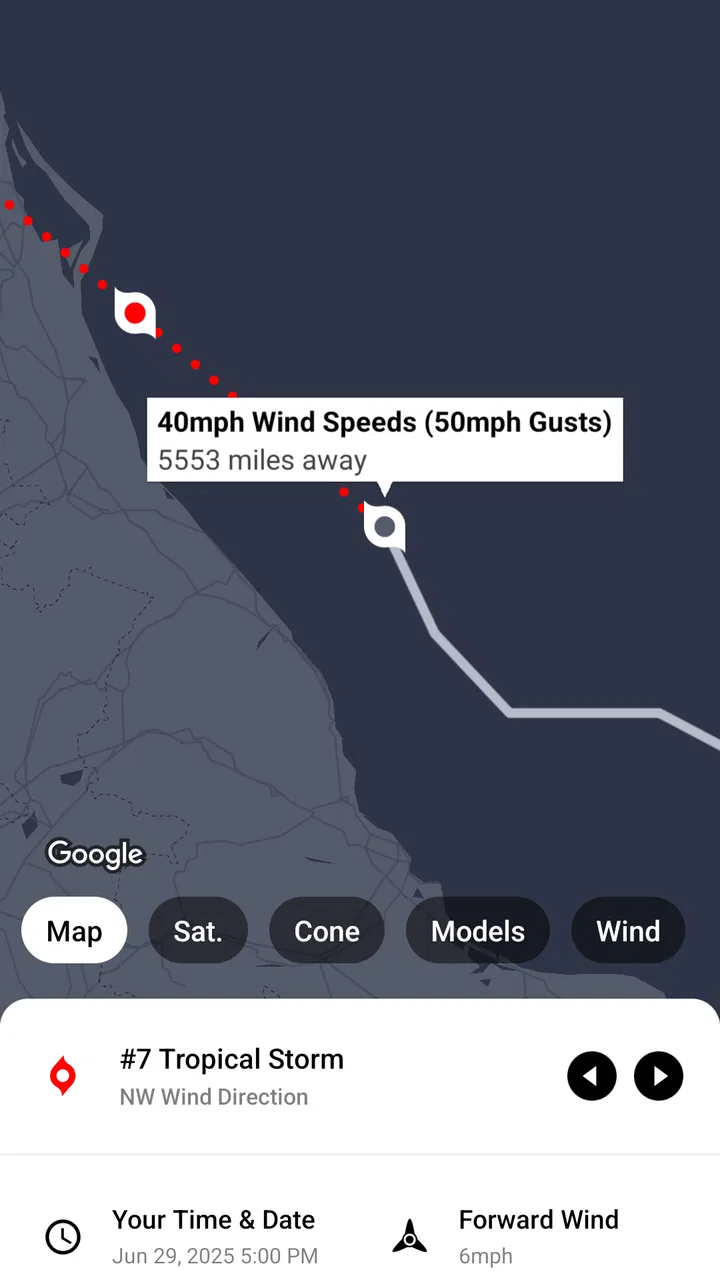
The map-based approach is especially valuable. A written warning can tell me that a system is active, but a map helps me understand direction and distance. When I am checking whether a storm could affect a route or a family member, seeing the system in geographical context is more practical than reading isolated forecast sentences. The app’s emphasis on maps makes it a better companion for tracking than a basic daily-weather tool.
What I would check before relying on it
I would not open this app for every ordinary weather question. If I only want to know whether to carry an umbrella this afternoon, a conventional local forecast may be faster and less distracting. My Hurricane Tracker & Alerts earns its place when the weather event itself is the subject, not when severe conditions are merely one possibility among many.
That distinction matters because the app should complement, rather than replace, official emergency instructions. During a serious event, I would use it to understand the broader picture and follow a system’s development, then check local authorities for evacuation orders, shelter information, road closures, and instructions specific to my location. A tracker can improve awareness, but it should not become my only source of safety decisions.
Useful workflows beyond simply opening the map
One practical workflow is to check the app at three different moments instead of staring at it continuously. I would look once when a system first becomes relevant, again before leaving home or starting a journey, and once more after arriving somewhere safe. This reduces unnecessary checking while preserving the information that actually changes a decision. The app is more useful as a monitoring tool than as something I need to keep open all day.
A second useful habit is comparing the map with the forecast context rather than interpreting the projected path by itself. A line on a map can look precise even though weather systems change. I find it better to treat the path as a planning aid and ask broader questions: Is the system moving toward the area I care about? Is the timing close to my travel window? Do local warnings say something more urgent? That keeps the visual information useful without giving it more certainty than it deserves.
I also like the idea of using the app for communication. If a relative is away from home, I can use the map to explain where a system is and how its movement relates to their area. That is more constructive than forwarding a dramatic screenshot without context. The app becomes a shared reference point, especially when several people are trying to decide whether a planned activity should continue.
Heavy-use moments expose the real trade-offs
The most demanding situation is likely to be a fast-moving weather event when many people are checking updates repeatedly. In that moment, I care about three things: whether the app opens consistently, whether the map remains understandable, and whether I can recover easily if a screen takes longer than expected. I would not judge it only by a quiet test on a stable connection, because severe-weather use is exactly when attention and patience are limited.
Even a well-designed tracker cannot make every update instantaneous. Weather information depends on network access and on the arrival of new information, so a delay in displaying something does not automatically mean the app is broken. My practical advice is to open it before conditions become critical, give the relevant map or forecast time to load, and avoid treating a single slow refresh as proof that the situation has changed.
There is also a human performance issue. During a storm, I can easily refresh too often, switch between views without reading them, and confuse an older screen with a new one. The app’s focused design helps reduce that clutter, but it cannot remove the need for disciplined checking. I would read the timestamp or update context where available, compare the latest view with the previous one, and then return to official local guidance for action.
For travel, I would use it before departure rather than while driving. A passenger can monitor conditions, but the person behind the wheel should not be interacting with a weather map. This sounds obvious, yet a map-heavy tracker naturally invites visual attention. Its usefulness is highest during planning stops, at home, or with someone else handling the phone.
Stability and recovery in normal conditions
My experience with a focused weather app is that stability matters more than decorative extras. I want the core screen to remain understandable after moving between the map and forecast information, and I want to be able to return to the relevant event without rebuilding my entire search. My Hurricane Tracker & Alerts feels designed around that kind of repeated checking rather than a single one-time visit.
Recovery is particularly important when the connection is weak. If I am near a coast, traveling, or dealing with overloaded mobile networks, I cannot assume every view will appear immediately. I would close and reopen the affected screen, confirm that the connection is active, and then cross-check the result with another trusted source if the information is important. That is not a criticism unique to this app; it is a sensible limitation of live weather tracking.
I also recommend keeping expectations realistic after an interruption. If the app has been in the background for a while, I would not assume that the screen I left open is still the newest view. Reopening the relevant information before making a decision is a small but worthwhile habit. This is one of the less obvious differences between casually browsing weather and using a tracker during a developing event.
The current version is 26.4.1, which tells me the app has continued to receive development attention over time. I still would not equate a version number with perfect reliability. Updates can improve an app, but the quality of a particular session will also depend on the phone, operating system, network, and the weather information being delivered. My confidence comes from the app’s focused purpose, not from assuming that every loading situation will be flawless.
Device demands and practical limitations
Because the app centers on forecasts and maps, I would expect it to use more attention and possibly more resources than a simple text forecast, especially while browsing detailed visual information. I would not call that a problem by itself. A map needs to display more than a single temperature number, and the extra visual context is exactly why I would choose this app.
On an older phone, I would keep the workflow simple: open the app, check the relevant system, read the forecast context, and close it when finished. Avoiding unnecessary background use is sensible for any live-weather tool, particularly if battery life is already limited. The minimum requirement of Android 8.0 makes it accessible to many older devices, but compatibility does not guarantee that every older handset will feel equally smooth.
Screen size can also change the experience. On a compact phone, a map may require more zooming and panning, which makes quick interpretation harder. On a larger display, the geographical relationship between the storm and nearby areas should be easier to grasp. I would prefer a larger screen when planning a route or explaining the situation to someone else, while a small phone remains adequate for a quick check.
People with limited data should be thoughtful about when they use map-heavy weather information. I would check it over a reliable connection before leaving, especially if I expect to revisit the same event. I would not promise myself that a live tracker can substitute for an offline emergency plan. Printed contact details, charged devices, and local instructions remain important if connectivity fails.
Who will get the most from it
This app suits people who live in or travel through areas affected by tropical storms, tornadoes, or cyclones. It is also useful for relatives monitoring someone else’s location, outdoor planners who need to judge whether an event should go ahead, and anyone who prefers visual storm tracking to a stream of headlines. The age rating of Everyone makes it approachable for households, although younger users should still be shown how to interpret severe-weather information responsibly.
I can also see value for people who find general weather apps too broad. If I open a standard forecast and have to search through several tabs before reaching storm information, a dedicated tracker feels more direct. The free price removes a financial barrier for someone who wants this specialized function without committing to a subscription-based weather service.
On the other hand, I would skip it if my main need is hyperlocal everyday forecasting. Someone choosing clothes for work, checking a precise rain window, or comparing ordinary hourly temperatures may find a local forecast app more convenient. I would also avoid relying on this app alone for official emergency instructions, because tracking a system and receiving location-specific orders are different jobs.
How it compares with ordinary weather alternatives
Compared with a typical weather app, My Hurricane Tracker & Alerts is narrower but more purposeful. The usual alternative often wins for routine forecasts, widgets, quick temperature checks, and broad daily planning. This app wins when I need to follow a named or developing severe-weather situation and understand its movement on a map.
Compared with reading news reports, it offers a more visual way to follow the event. News can provide valuable explanations and local reporting, but articles may be slower to scan when I simply need geographical context. The tracker is better for checking the system itself; news and official channels are better for consequences, local instructions, and human impact.
Compared with official emergency sources, it serves a different purpose. Official sources should guide urgent action, while this app can help me maintain a wider view of the weather system. I would use both rather than choosing one. That combination is one of the strongest practical setups: the tracker helps me understand, and local authorities tell me what to do.
My performance verdict after using it as a dedicated tracker
My Hurricane Tracker & Alerts feels most convincing when I judge it on focus, not on whether it replaces every other weather tool. It gives severe-weather monitoring a clear home, and its map-centered approach makes it easier for me to connect a storm’s movement with places, routes, and people I care about. The free access and broad device compatibility make it easy to try without much commitment.
Its limitations are equally clear. It depends on live information and a usable connection, map viewing can demand more attention than a simple forecast, and it should not be mistaken for a substitute for official warnings. People who only need ordinary local weather may find its specialized purpose unnecessary. Those are not reasons to dismiss it; they are reasons to use it in the right role.
For me, the best setup is to keep a general weather app for everyday planning, use this one when severe weather becomes relevant, and follow official local instructions whenever safety is involved. That division prevents the tracker from being overloaded with expectations it was not designed to meet.
With an average rating of 4.7 and a substantial user base, the app has clearly found an audience for this focused approach. I would recommend it to a friend who wants a straightforward way to watch hurricanes, tornadoes, or cyclones and who understands that tracking is only one part of preparedness. Its real strength is helping me see the weather event clearly before I decide what to do next.
FAQs for My Hurricane Tracker & Alerts
01What is My Hurricane Tracker & Alerts, and what does it do?
My Hurricane Tracker & Alerts is a weather app focused on tropical storms, hurricanes, typhoons, and cyclones. It provides storm tracking maps, projected paths, current storm information, weather alerts, and updates from official meteorological sources. During testing, its main advantage was keeping hurricane-related information in one place, although users should still consult local authorities for evacuation instructions.
02Does My Hurricane Tracker & Alerts provide accurate and official hurricane information?
The app is designed to present data from recognized weather and hurricane-monitoring agencies, helping users follow storm location, movement, intensity, and forecast changes. Accuracy depends on the quality and timing of the underlying official data, so forecasts can change as conditions develop. It should be treated as an informative tracking tool, not a replacement for emergency services or government warnings.
03Can I receive hurricane and severe weather alerts on my phone?
Yes, the app supports notifications for tropical storms, hurricanes, and other relevant weather events, depending on the features available in your region and the permissions enabled on your device. Before relying on alerts, allow notifications, confirm your location settings, and review the alert preferences. For safety-critical situations, also enable official local emergency alerts from your phone and authorities.
04Does My Hurricane Tracker & Alerts work without an internet connection?
The app generally requires an internet or mobile data connection to download current storm positions, forecast tracks, maps, and newly issued alerts. Previously loaded information may remain visible temporarily, but it should not be considered current when offline. If you are traveling through an area affected by a hurricane, download important information in advance and keep alternative sources available, such as local radio or emergency broadcasts.
05Is My Hurricane Tracker & Alerts free to download, and are there advertisements or paid features?
The app may be available as a free download, but the exact experience can vary between Android and iOS and may include advertising, optional upgrades, or premium features. Check the store listing on your device for the current pricing, subscription terms, and in-app purchase details before installing. Also review the app’s privacy information, particularly if you enable location access or push notifications.
Pros
- Tracks hurricanes
- tropical storms
- and disturbances worldwide
- Provides forecast paths to help users monitor potential threats
- Offers customizable weather and storm alert notifications
- Includes useful storm history and past hurricane information
- Maps make storm locations and projected movement easy to understand
Cons
- Some advanced features may require an in-app purchase
- Forecast paths can change quickly as new data becomes available
- Alerts depend on internet access and enabled device notifications
- Information may feel excessive for users outside hurricane-prone regions
- Advertising can interrupt the experience in the free version

My Hurricane Tracker & Alerts
Gallery